The Passes Account Switcher: Manage Multiple Accounts Without Logging In and Out
Our new Account Switcher is ready for both creators and fans to use.
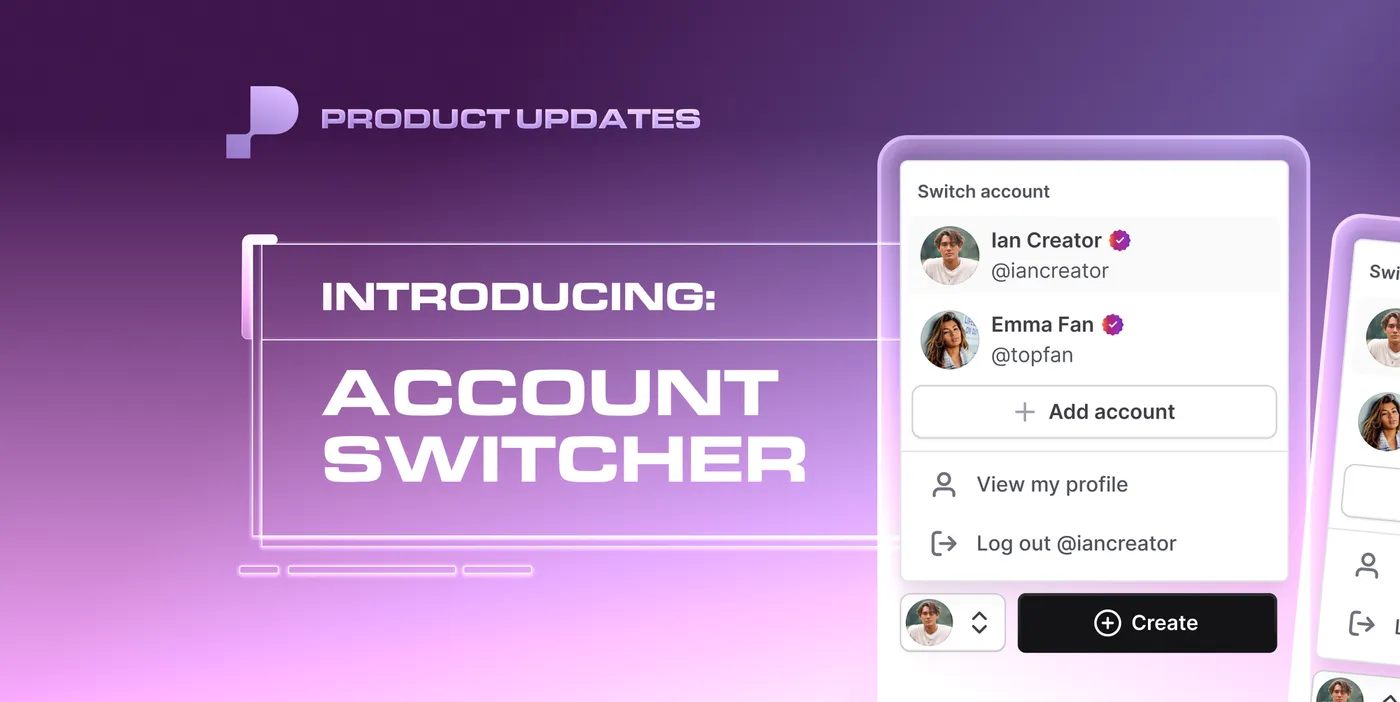
Managing multiple Passes accounts just got significantly easier. The new Account Switcher lets you toggle between accounts instantly from the navigation bar, with no logging in and out required.
Whether you are a creator managing content across different niches, a creator who also maintains a fan account, or a fan following multiple communities, everything you need is now one click away.
Who the Account Switcher Is Built For
Creators With Fan Accounts
If you love supporting other creators while building your own community, the Account Switcher lets you move seamlessly between your creator profile and your fan account. You can engage authentically in both roles without breaking your workflow or losing your place.
Multi-Niche Creators
If you run separate accounts for different content verticals, such as a podcast channel and a daily vlog channel, the Account Switcher keeps your audiences and content streams organized without the constant login shuffle. Each account stays distinct while you manage both from one place.
- Creators with Fan Accounts: Love supporting other creators while building your own community? Now you can switch seamlessly between your creator profile and fan account to engage authentically in both roles.
- Multi-Niche Creators: Keep your content organized across specialized accounts. Let’s say you’re a podcaster who also wants to try daily vlogging. Now you can manage those distinct audiences and content streams without the constant login shuffle.
How to Use the Account Switcher on Passes
For Creators
On Desktop
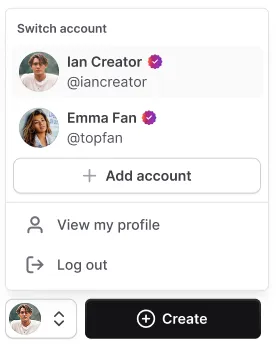
- Your profile avatar has moved from the top left of the navigation bar to the bottom left, next to the Create button
- Click your avatar to open the account switcher vertically
- From there you can navigate to your profile, log out, add a new account, or switch to a different account instantly

On Tablet
- On smaller screens and tablet views, the profile avatar and account switcher open to the right side of your avatar
- All the same options are available: switch accounts, add a new account, go to your profile, or log out
On Mobile
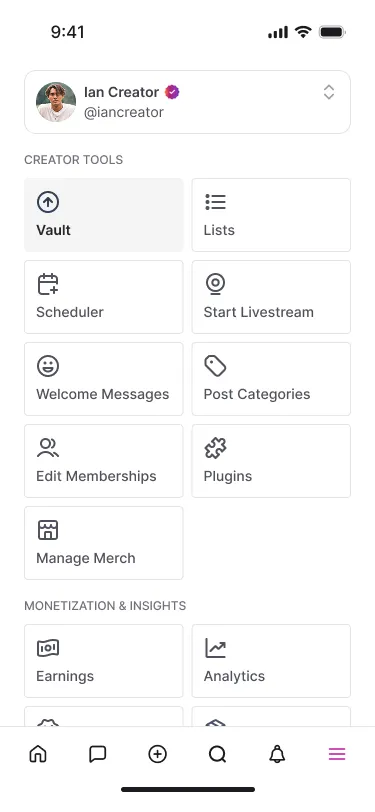
- Tap the hamburger menu on the bottom right to open the full navigation bar
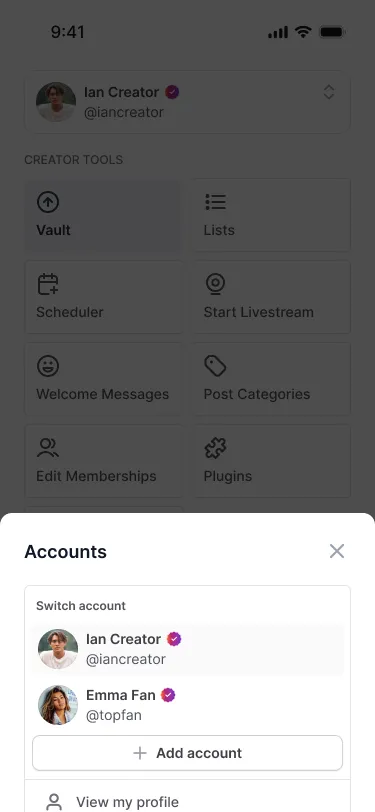
- The account switcher is located at the top of the full navigation bar
- Scroll up if the account switcher has scrolled out of view, it reappears when you scroll back up
- Tap the account switcher to switch between profiles you have previously logged into or add a new account
- The logout button is located within the full navigation bar
For Fans
On Desktop
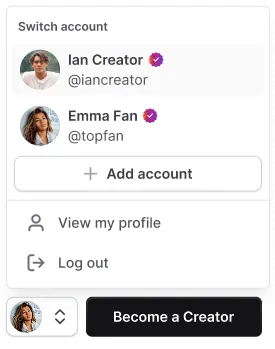
- Your profile avatar appears next to the Become a Creator button on the bottom left navigation bar
- Click your avatar to switch between accounts, add a new account, visit your profile, or log out
On Tablet
- The tablet view for fans mirrors the creator experience with one difference: fans see the Become a Creator button instead of the plus button
On Mobile
- The mobile experience for fans mirrors the creator setup with one difference: the main call-to-action button reads Become a Creator instead of the Create button
Frequently Asked Questions About the Passes Account Switcher
What is the Passes Account Switcher? The Account Switcher is a feature on Passes that lets creators and fans toggle between multiple accounts instantly from the navigation bar without needing to log in and out each time. It is available on desktop, tablet, and mobile.
How do I switch between accounts on Passes? On desktop, click your profile avatar in the bottom left of the navigation bar to open the account switcher and select the account you want to switch to. On mobile, tap the hamburger menu in the bottom right to open the full navigation bar and tap the account switcher at the top.
Can I use the Account Switcher to manage a creator account and a fan account at the same time? Yes. The Account Switcher is designed specifically for this use case. You can move between your creator profile and your fan account instantly without logging out, making it easy to engage in both roles from one device.
How do I add a new account to the Passes Account Switcher? On desktop and tablet, click your profile avatar to open the account switcher and select Add Another Account. On mobile, tap the hamburger menu to open the full navigation bar, then tap the account switcher and select the option to add a new account.
Where is the Account Switcher located on the Passes mobile app? On mobile, the Account Switcher is located at the top of the full navigation bar, which you can access by tapping the hamburger menu in the bottom right corner of your screen. If you scroll down in the navigation bar and the switcher disappears, scroll back up and it will reappear.
Can fans use the Passes Account Switcher? Yes. Fans have access to the same Account Switcher functionality as creators. The experience is identical on desktop, tablet, and mobile, with the only difference being that fans see a Become a Creator button instead of the Create button.
Where is the logout button on Passes mobile after the Account Switcher update? On mobile, the logout button is located within the full navigation bar, which you access by tapping the hamburger menu on the bottom right of your screen.
One Click to Any Account, on Any Device
The Passes Account Switcher removes the friction of managing multiple accounts and gives you full control over how you navigate your presence on the platform. Whether you are switching between niches, toggling between creator and fan mode, or simply managing more than one community, it all happens instantly from wherever you are on Passes.
Log into your Passes account and try the Account Switcher today.